> ## Documentation Index
> Fetch the complete documentation index at: https://deepl-c950b784-docs-language-table-from-v3.mintlify.site/llms.txt
> Use this file to discover all available pages before exploring further.
# Retrieving Usage Data
> Compare DeepL's usage data sources and pull character and minute consumption for your account, API keys, or custom tags.
DeepL offers several ways to retrieve usage data so you can track character and minute consumption and the associated costs. This guide compares the available data sources and shows how to use each one.
Consumption data in the account UI, in CSV exports, and in the [Admin API analytics endpoints](/api-reference/admin-api/get-usage-analytics) is available up to and including the previous UTC calendar day. For near-real-time data, use the [`/usage` endpoint](/api-reference/usage-and-quota/check-usage-and-limits).
## Choose a data source
| Data source | Scope | Time range | Data freshness | Interface |
| ------------------------------------------------- | ------------------------------------------------- | ---------------------------------------------------------------- | ------------------------------- | ------------ |
| [API Keys & Limits tab](#api-keys-and-limits-tab) | Per API key | Current usage period only | Previous UTC day | Account UI |
| [API Usage tab](#api-usage-tab) | Account total (plus year-to-date on yearly plans) | Current usage period (and yearly period) | Previous UTC day | Account UI |
| [Key-level CSV export](#api-key-level-csv-export) | Per API key | Custom or preset ranges up to 4 months, optional grouping by day | Previous UTC day | CSV download |
| [`/usage` endpoint](#the-usage-endpoint) | Account total | Current usage period only | Near-real-time (within minutes) | REST API |
| [Admin API analytics](#admin-api-analytics) | Per API key or per custom tag | Custom date range, optional grouping by day | Previous UTC day | REST API |
Use the **account UI** for a quick check while signed in, the **CSV export** for detailed or offline analysis per key, the **`/usage` endpoint** for programmatic near-real-time quota checks, and the **Admin API analytics endpoints** for programmatic reporting and cost attribution via custom tags.
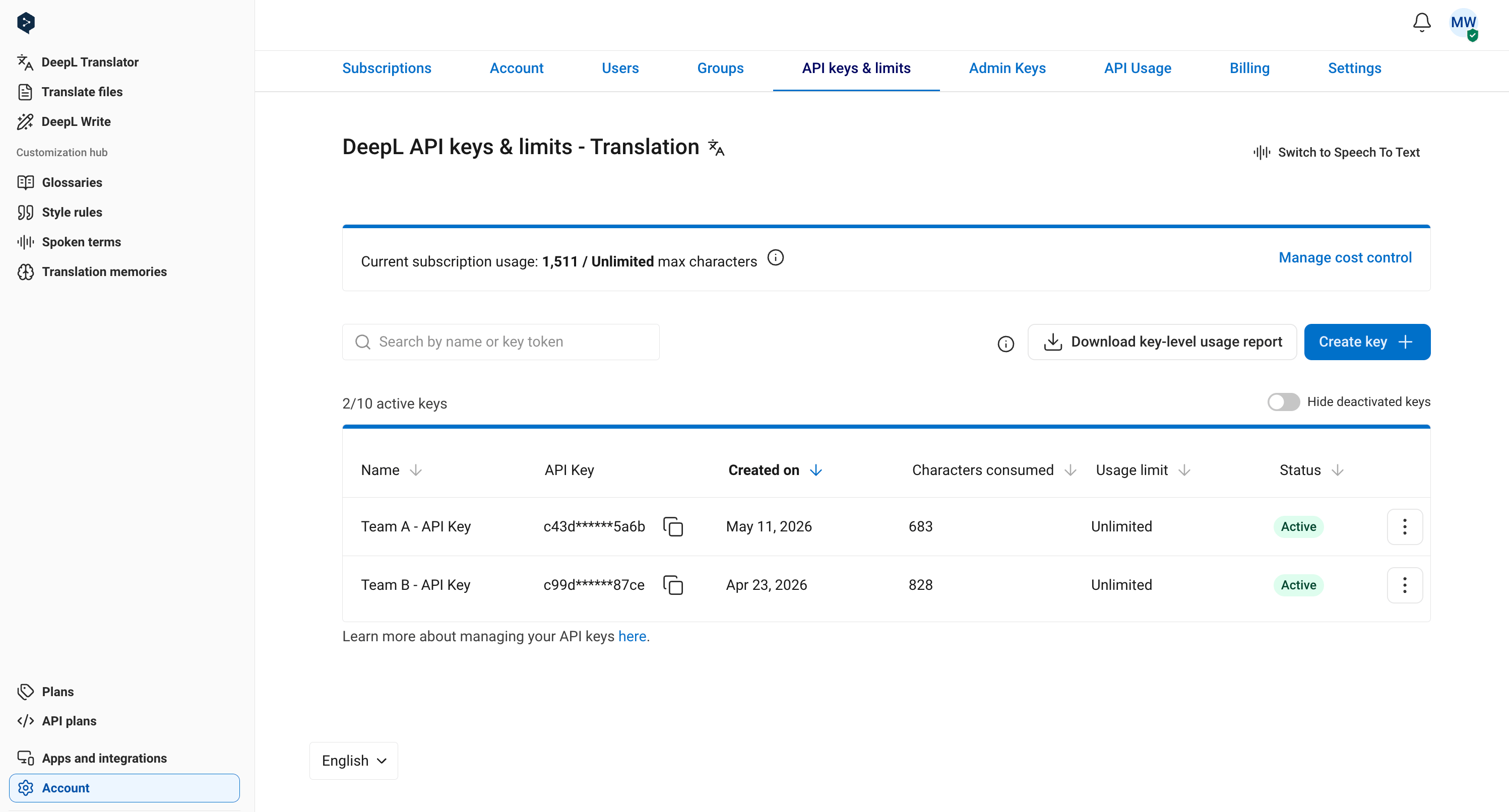
## API Keys and Limits tab
To check per-key consumption for the current monthly usage period, open the [API Keys & Limits tab](https://www.deepl.com/your-account/keys). It shows character and speech-to-text (STT) minute consumption for each API key.
 ## API Usage tab
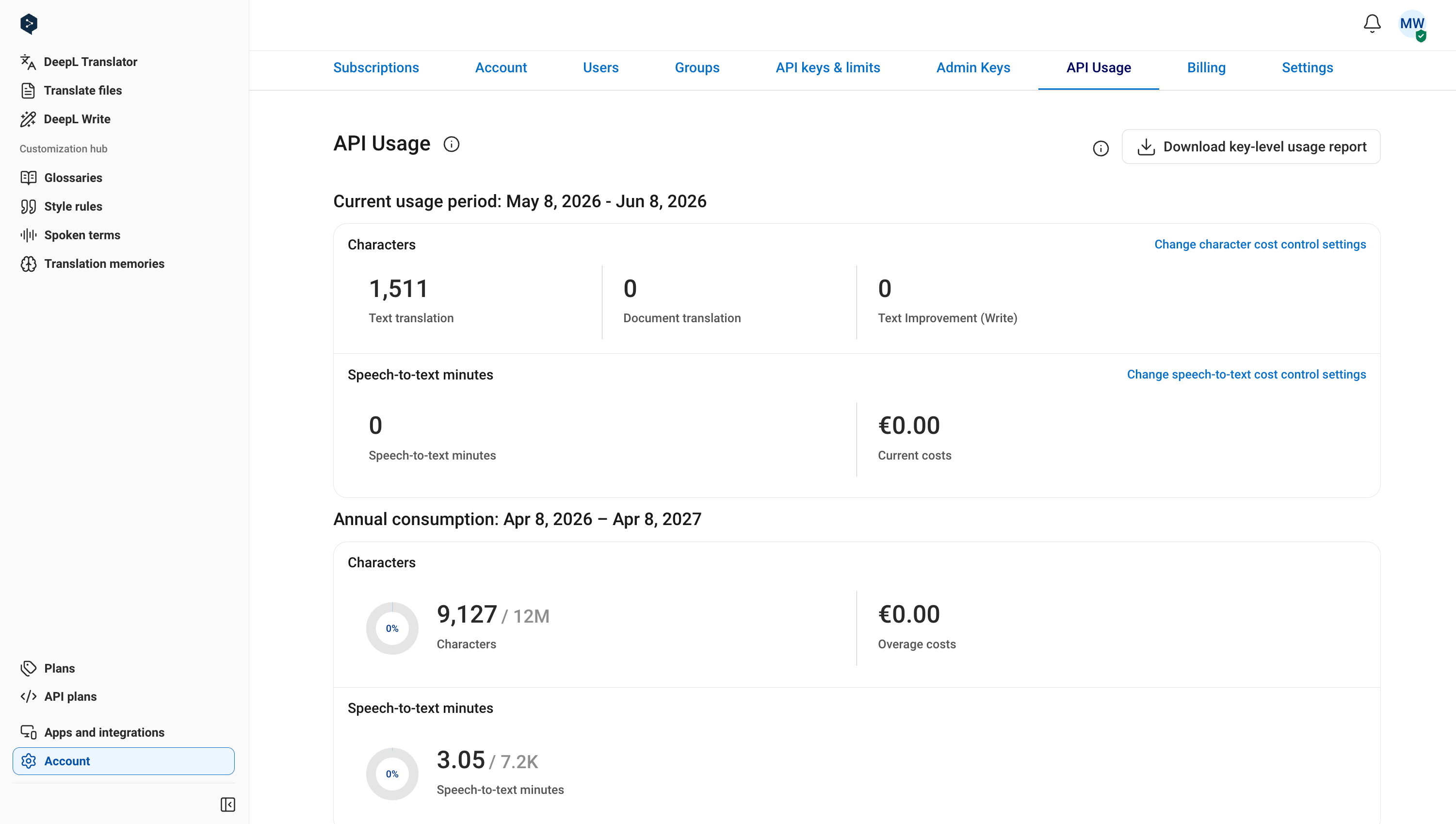
To check your account totals, open the [API Usage tab](https://www.deepl.com/your-account/usage). It shows total character and STT minute usage for the current monthly usage period, and if you're on a yearly plan, usage to date for your yearly billing period, too.
## API Usage tab
To check your account totals, open the [API Usage tab](https://www.deepl.com/your-account/usage). It shows total character and STT minute usage for the current monthly usage period, and if you're on a yearly plan, usage to date for your yearly billing period, too.
 ## API key-level CSV export
Generate a CSV report with key-level characters translated for a chosen time period. Key-level usage is not broken out on invoices; it's only available via CSV export or on the "API Keys & Limits" tab.
To download a report, click "Download key-level usage report" on the [API Keys & Limits tab](https://www.deepl.com/your-account/keys) or "Download report" on the [API Usage tab](https://www.deepl.com/your-account/usage), then select a time period and click "Download your report".
## API key-level CSV export
Generate a CSV report with key-level characters translated for a chosen time period. Key-level usage is not broken out on invoices; it's only available via CSV export or on the "API Keys & Limits" tab.
To download a report, click "Download key-level usage report" on the [API Keys & Limits tab](https://www.deepl.com/your-account/keys) or "Download report" on the [API Usage tab](https://www.deepl.com/your-account/usage), then select a time period and click "Download your report".
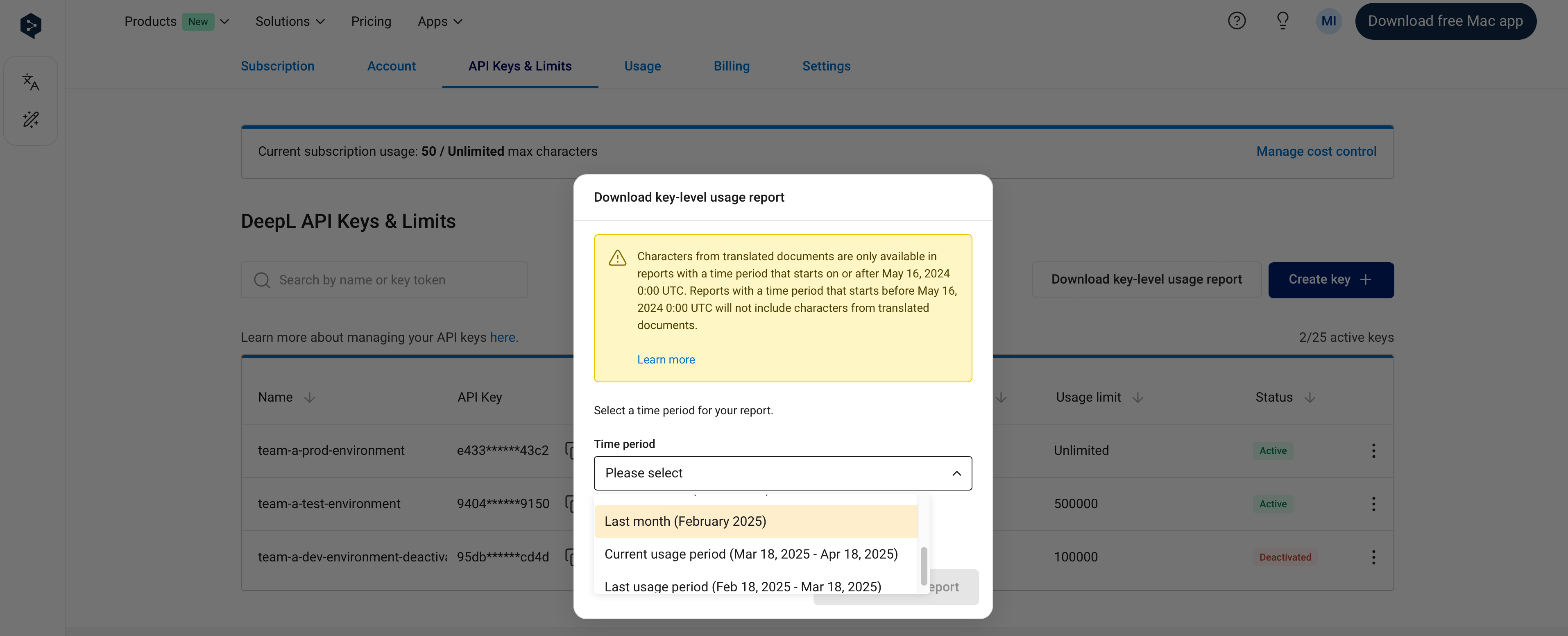 Select a custom date range of up to 4 months (on UTC calendar days) or one of the presets, which cover rolling windows from the last 24 hours up to the last year as well as calendar months and usage periods. Rolling presets include the current day; calendar-month and usage-period ranges align to UTC day or period boundaries, so they might not start and end on a full calendar day.
For all time ranges except "Last 24 hours", "Current usage period", and "Last usage period", you can also group key-level usage data by UTC calendar day:
Select a custom date range of up to 4 months (on UTC calendar days) or one of the presets, which cover rolling windows from the last 24 hours up to the last year as well as calendar months and usage periods. Rolling presets include the current day; calendar-month and usage-period ranges align to UTC day or period boundaries, so they might not start and end on a full calendar day.
For all time ranges except "Last 24 hours", "Current usage period", and "Last usage period", you can also group key-level usage data by UTC calendar day:
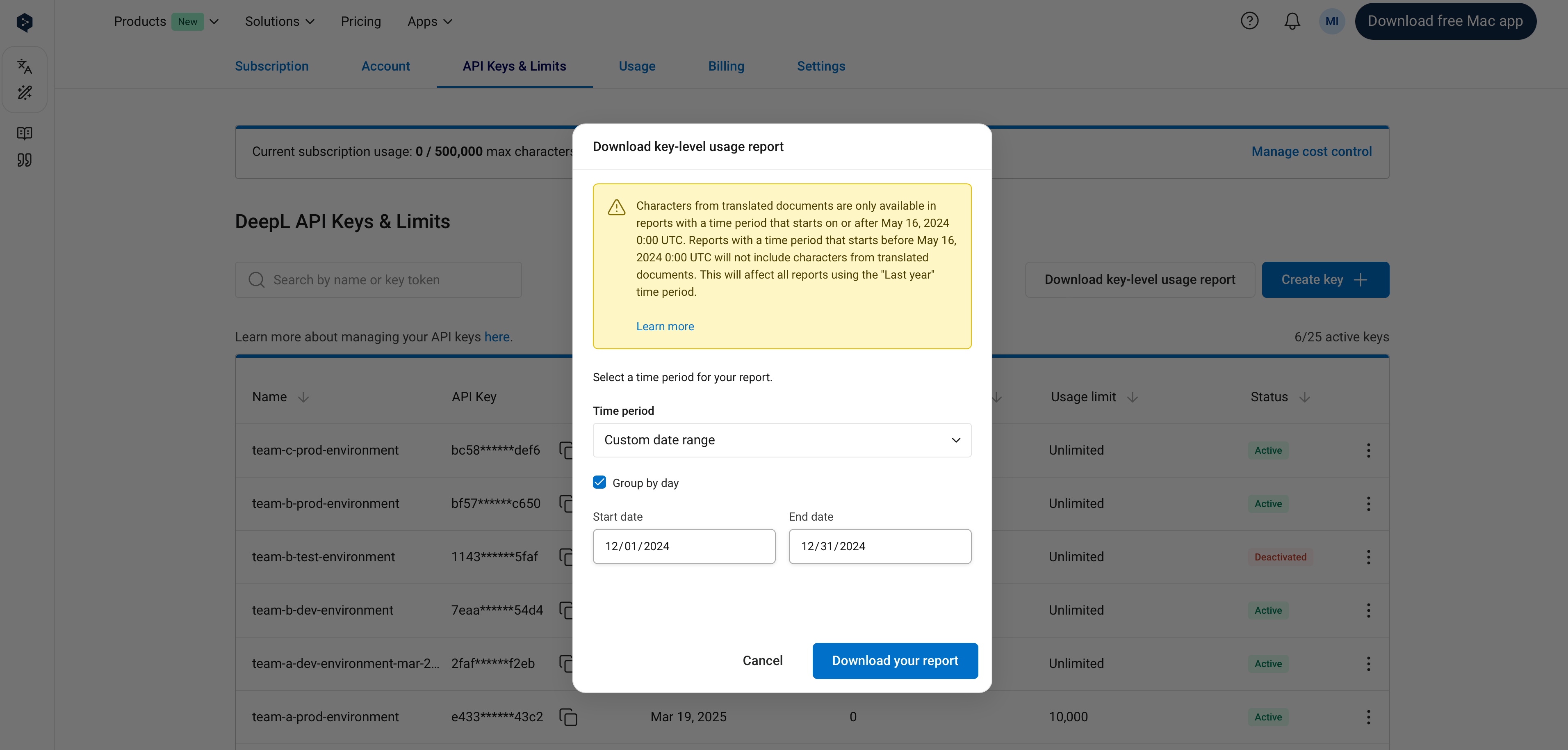 Document translation data is only included in reports with a time period starting on or after May 16, 2024 00:00 UTC. Text translation data is included for all time periods.
## The usage endpoint
The [`/usage` endpoint](/api-reference/usage-and-quota/check-usage-and-limits) returns a near-real-time snapshot of character and minute usage in the current monthly usage period, typically up to date within a few minutes of the usage being generated. Use it for programmatic quota checks, for example before submitting a large translation batch.
## Admin API analytics
The Admin API provides programmatic access to usage data over a custom date range, with optional grouping by day. It requires [Admin API access](/docs/admin/overview#the-admin-api) and an [admin key](/docs/admin/managing-api-keys#manage-admin-api-keys) for authentication. Two endpoints are available:
* [Get usage analytics](/api-reference/admin-api/get-usage-analytics) returns usage statistics across all services (text translation, document translation, text improvement, and speech-to-text), in total or grouped by API key
* [Get custom tag usage analytics](/api-reference/admin-api/get-custom-tag-usage-analytics) returns usage broken down by custom tag
Custom tags are an optional dimension for cost attribution: attach a tag to individual API requests with the `X-DeepL-Reporting-Tag` header to track consumption by team, project, or any other category. Only tagged requests appear in custom-tag analytics, so results reflect a subset of total usage unless every request is tagged. See [How to use custom reporting tags](/docs/learning-how-tos/examples-and-guides/how-to-use-custom-reporting-tags) for setup and naming guidance.
For a worked example of pulling analytics data into a dashboard, see the [usage analytics dashboard cookbook](/docs/learning-how-tos/cookbook/usage-analytics-dashboard).
Document translation data is only included in reports with a time period starting on or after May 16, 2024 00:00 UTC. Text translation data is included for all time periods.
## The usage endpoint
The [`/usage` endpoint](/api-reference/usage-and-quota/check-usage-and-limits) returns a near-real-time snapshot of character and minute usage in the current monthly usage period, typically up to date within a few minutes of the usage being generated. Use it for programmatic quota checks, for example before submitting a large translation batch.
## Admin API analytics
The Admin API provides programmatic access to usage data over a custom date range, with optional grouping by day. It requires [Admin API access](/docs/admin/overview#the-admin-api) and an [admin key](/docs/admin/managing-api-keys#manage-admin-api-keys) for authentication. Two endpoints are available:
* [Get usage analytics](/api-reference/admin-api/get-usage-analytics) returns usage statistics across all services (text translation, document translation, text improvement, and speech-to-text), in total or grouped by API key
* [Get custom tag usage analytics](/api-reference/admin-api/get-custom-tag-usage-analytics) returns usage broken down by custom tag
Custom tags are an optional dimension for cost attribution: attach a tag to individual API requests with the `X-DeepL-Reporting-Tag` header to track consumption by team, project, or any other category. Only tagged requests appear in custom-tag analytics, so results reflect a subset of total usage unless every request is tagged. See [How to use custom reporting tags](/docs/learning-how-tos/examples-and-guides/how-to-use-custom-reporting-tags) for setup and naming guidance.
For a worked example of pulling analytics data into a dashboard, see the [usage analytics dashboard cookbook](/docs/learning-how-tos/cookbook/usage-analytics-dashboard).